
How to change homepage in wordpress?
WordPress is very famous for blogs but now it is widely using as content management system and e-commerce solutions where we don’t need blog post page as homepage. By default wordpress based site has blog post on homepage. So we can change homepage to any page and blog posts can be shown on another page. Following are few steps that need to change homepage.
First of all you must have to create two pages in Admin -> Pages -> Add New
We will use one page as homepage and other for blog posts. For example I created Home for homepage and Blog for blog posts. After creating pages go to Settings -> Reading
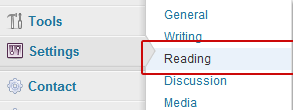
Following page open with default settings.
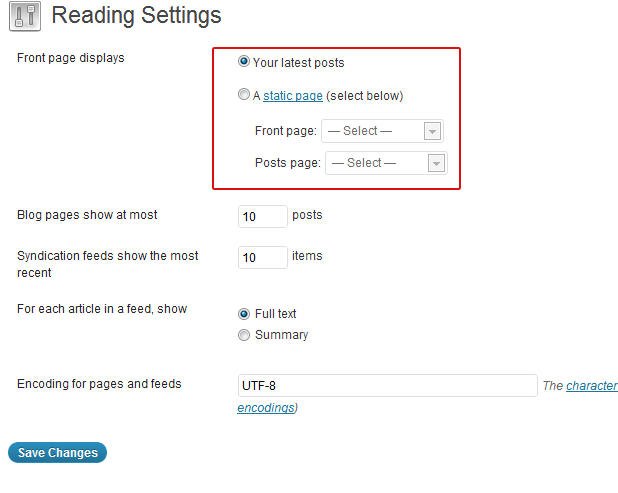
Now you can see in above image that homepage displays latest blog posts. We can change it. Click on radio button A static page (select below). When you click on it, both select drop downs will be enabled and you can select any page that you want to show as homepage and for blog posts. I will set Home for homepage and Blog for blog posts and click on Save Changes button to save your changes.
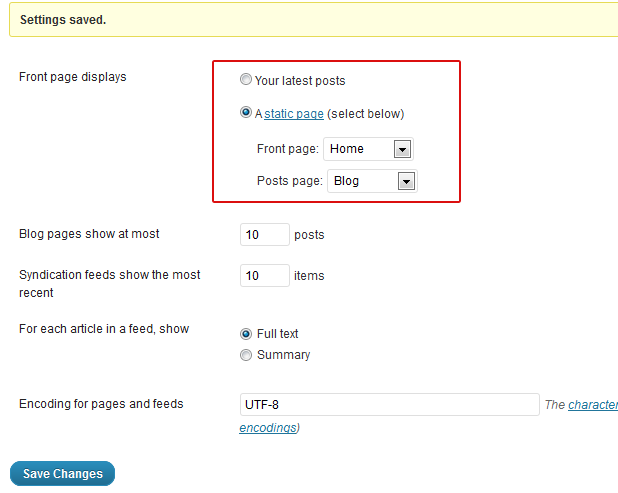
Now homepage will be changed from blog posts to static page and blog posts will be shown on Blog page. If you have any questions then leave comment here.









Nice post. Thank for sharing it.