pik add command is used to register your installed ruby environments with pik. For example, I have Ruby 1.9.3, and 2.0.0 installed on my windows, so I used the following in a Command Prompt:
> pik add C:\Ruby193\bin
INFO: Adding:  [ruby-]1.9.3-p392
      Located at:  C:\Ruby193\bin

> pik add C:\Ruby200\bin
INFO: Adding:  [ruby-]2.0.0-p0
      Located at:  C:\Ruby2000\bin
Use the pik list command to list all the ruby interpreters registered with pik:
> pik list
   ruby-1.9.3-p392
   ruby-2.0.0-p0
Make a default Ruby
The pik use command will allow you to switch between your registered ruby interpreters:
> pik use ruby-2.0.0-p0
> ruby -v
ruby 2.0.0p0 (2013-02-024) [i386-mingw32]
Add the –default parameter to set one version as the default:
> pik use ruby-1.9.3-p392 --default
You can use the pik default command to switch to this version:
> pik default
> ruby -v
ruby 1.9.3p392 (2013-02-022) [i386-mingw32]
When you open a command prompt, pik might not automatically loaded, so you will notice that there is no default ruby loaded:
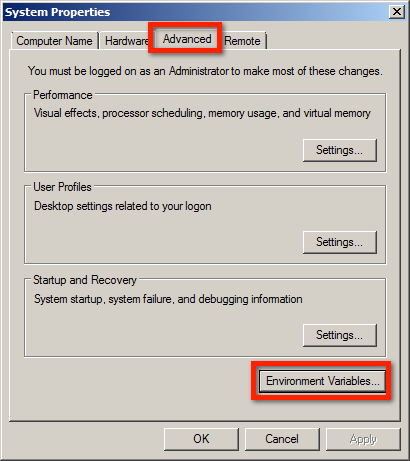
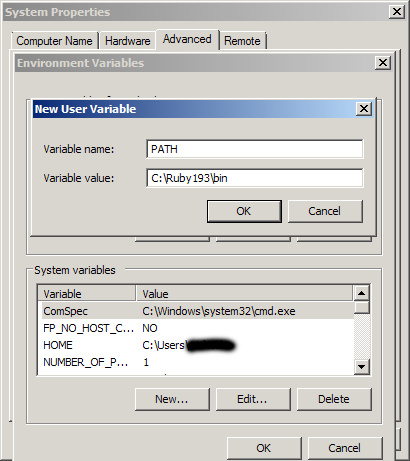
Run the pik default command to load pik or add one particular Ruby interpreter to your user or system PATH environment variable from Control Panel -> System -> Advanced -> Environment Variables
Most "AI agent" content online is still stuck at the demo stage — a slick…
If you've been using Claude Code as little more than a fancy autocomplete — typing…
When building real-world Laravel applications, email handling quickly becomes scattered. You send emails from controllers,…
Build flexible, readable, and secure query filters across multiple Laravel models — no more bloated…
Artificial Intelligence is transforming how we work, create, and earn. But most people get stuck…
In today’s fast-paced world, businesses can no longer rely solely on traditional methods to stay…

View Comments
You should be a part of a contest for one of the most useful sites online. I most certainly will recommend this website!